
Push The Luck
Cadev GamesTrivia
3.8414.00 Reviews
- Version
- 3.6
- Installs
- 100.00K
- Age Rating
- Everyone
Screenshots

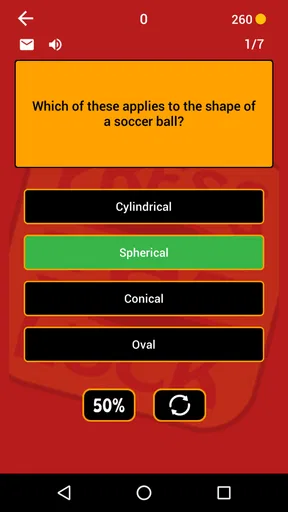
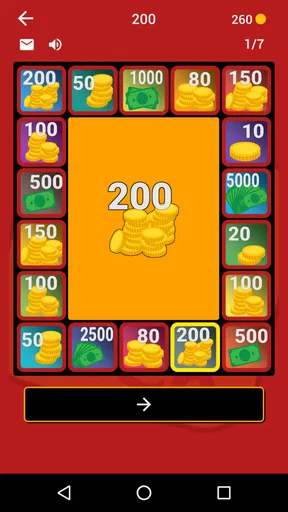
Our Review of Push The Luck
 Analysis by Appyee
I found Push The Luck most interesting as a quick shared-device trivia game rather than as a traditional quiz app. Its central idea is simple: choose the correct box, accept the risk, and see whether your decision pays off. That makes it easy to explain when someone hands over a phone at the kitchen table, during a short break, or while waiting for an appointment. I do not need to teach a complicated ruleset before another person can join in.
The game comes from Cadev Games and is free to download, with optional purchases ranging from $1.49 to $19.99 per item. It is listed for Everyone, which fits its straightforward presentation, although an age label should never replace a parent’s judgment about how a child handles competition, guessing, or spending prompts. The game has been available since February 1, 2018, and its current version is 3.6, so it is not a brand-new experiment trying to find its identity.
How it works when several people share one phone
The strongest use case is a small group passing one device around. One person reads or interprets the trivia challenge, another chooses a box, and everyone watches the result. Because the interaction is built around pressing a choice rather than navigating a large quiz library, the game can fill a few spare minutes without asking the group to create accounts, organize a tournament, or agree on a long session first.
I would use it in a household when nobody wants to commit to a full board game. A parent might put the phone on the table after dinner, let one child make the first choice, and then rotate turns. The important detail is to agree on the turn order before starting. The game itself is about luck and correct selection, so arguments can easily shift from “that was unlucky” to “you skipped my turn” if the group has not set a simple routine.
That shared-device format also gives the game a different feel from a private trivia app. With a conventional quiz, each player often answers silently on their own screen. Here, the decision becomes a visible moment. Everyone sees the box being pressed, which creates suspense, but it also means the game is less suitable for people who want quiet individual practice or a serious knowledge test.
I would keep sessions informal. A useful household rule is to stop after everyone has had the same number of turns, rather than allowing the person holding the phone to continue until a lucky run ends. Another good rule is to treat purchases as an adult-only decision. The game is free to start, but the presence of optional items means the person managing the device should handle any spending discussion separately from the excitement of a round.
A simple routine prevents most shared-device friction
Before handing over the phone, I would decide three things: who starts, how turns move, and when the session ends. Those choices sound minor, but they matter more here than in a solo trivia app because the game’s appeal comes from quick decisions. If players pause after every attempt to negotiate the rules, the energy disappears.
For a family group, rotating by person is clearer than rotating by score. A child who answers incorrectly should still receive the next turn when it arrives. That keeps the activity from becoming a test of who is already best at trivia, and it makes the luck element easier to enjoy. For adults, a score-based challenge may be more entertaining, but I would still agree on the scoring method before the first press rather than inventing it halfway through.
One practical tip is to keep the device in a neutral position instead of letting one player hold it close. That makes the selection visible and reduces accidental taps. It also helps when people are trying to judge whether a choice was deliberate. Since the core action is so small, the social setup around it has a surprisingly large effect on whether the session feels fair.
What to settle before letting children use it
The Everyone rating makes Push The Luck approachable for a broad audience, but I would not interpret that as a promise that every household will have the same experience. Younger players may focus on the reward of pressing the right box rather than the trivia itself. That is not necessarily a problem, yet an adult may need to frame the activity as a guessing game with questions, not as a reliable way to demonstrate knowledge.
Account boundaries are especially important on a shared phone. I would use a household device profile or an adult-controlled store account where appropriate, and I would not hand the phone over while a purchase prompt is being discussed or explored. The game is free, but optional purchases can change the way a child understands the session. A clear rule such as “we play with the free version unless an adult decides otherwise” avoids confusion and keeps the decision outside the heat of the round.
I also recommend explaining that luck can outweigh knowledge. A child who makes a sensible choice may still get an unwanted result, while a random choice may work. If the group treats every outcome as proof that someone is clever or careless, the game can become frustrating quickly. I found it more enjoyable when the household celebrated the decision and the suspense, not only the result.
For older children and teenagers, the game can work as a light social break, but I would still watch the tone of competition. A fast, public choice can make a hesitant player feel exposed, especially if everyone reacts loudly. Allowing a player to think for a moment, or letting them ask for the question to be repeated, makes the experience more welcoming without changing the rules.
Why trust matters more than the age label
There is no need to turn a short trivia session into surveillance, but shared use does call for basic trust. I would show children how to close the game when the agreed session ends, make it clear that store purchases require permission, and keep the device’s normal household boundaries in place. These habits are useful because the game may be entertaining, but it is still running on a phone that can contain other accounts and personal information.
I would also avoid presenting the game as an educational replacement. It may encourage curiosity and conversation, but its defining tension comes from choosing a box and taking a chance. If the goal is structured learning, a dedicated quiz app with topic selection, explanations, progress tracking, or classroom-style controls would be a better fit. Push The Luck works best when the family wants a playful challenge rather than a lesson plan.
Where it sits among ordinary trivia alternatives
Compared with a standard multiple-choice quiz, this game feels less like a knowledge assessment and more like a decision under uncertainty. A conventional trivia app is usually better when I want to select a subject, review wrong answers, or measure improvement. Push The Luck is better when the group wants a compact activity that can be understood immediately and enjoyed through shared suspense.
It also differs from large multiplayer quiz games that expect several phones or an online room. Those alternatives can offer richer competition and clearer individual scoring, but they require more setup and give each person a separate screen. Push The Luck’s shared-device approach is less sophisticated, yet that limitation is also its convenience. One phone is enough for a casual round among people sitting together.
Against a board game, the trade-off is similar. A physical game usually gives everyone a visible role and may offer deeper strategy, while this title removes preparation, pieces, and cleanup. If I have only a few minutes, that simplicity is valuable. If I want a full evening activity with meaningful planning, negotiation, or a lasting campaign, I would choose something else.
The game’s average rating is 3.8 from around 1.4 thousand ratings, with more than 400 written reviews, and it has passed 100 thousand installs. I read that level of reach as evidence that the concept is easy for people to try, not as proof that it will satisfy every trivia fan. The rating also fits my impression: the central idea is accessible, but players looking for depth, detailed learning tools, or a polished competitive system may find it limited.
Three ways to get more from the basic idea
My first useful approach is to turn the game into a conversation starter. After each result, ask why the player chose that box and whether the group would make the same decision. This adds a small reasoning layer without pretending that the game offers a formal explanation system. It works particularly well with children because the discussion can focus on confidence, uncertainty, and changing one’s mind.
Second, use a fixed number of turns rather than an open-ended session. This makes the game fair on a shared device and prevents a lucky streak from taking over the evening. It also gives the group a natural stopping point, which is helpful when the phone belongs to several people or when children are waiting for another activity.
Third, separate the social score from the app’s immediate outcome. I would keep a simple spoken tally of completed turns, correct answers, or successful choices only if everyone agrees on what counts. That avoids assuming the game provides a particular scoring system and lets the household adapt the activity to its own style. The trade-off is that someone has to remember the score, but the benefit is a clearer group structure.
A fourth tip is to use it as a warm-up rather than the main event. A few rounds can break the silence before a family board game, make a waiting period less dull, or give guests an easy activity while people are arriving. In that role, the lack of lengthy progression is an advantage. I would not expect it to carry a long session for a group that wants constant variety.
Technical fit and everyday convenience
The minimum operating-system requirement is Android 7.0, so the game is aimed at devices that are not extremely old but may still be common as spare household phones. Before installing it on a shared device, I would check that the phone is comfortable to pass around and that its store account is configured for the intended user. The game’s current version is 3.6, which is useful context when deciding whether it belongs on an older family handset.
Because the game is free, the initial barrier is low. That makes it easy to test during a short household session without committing money first. The more important question is not whether it costs anything to begin, but whether the optional purchase structure fits the household’s rules. I would treat every in-app item as optional and avoid making a child responsible for deciding whether a prompt should be accepted.
One limitation is that the format depends heavily on the group supplying its own structure. The game can start quickly, but it does not replace a host who keeps turns moving, settles disagreements, and decides when to stop. That is fine for two adults or older children, but a younger group may need an adult to guide the session. If you want a fully organized multiplayer experience, a dedicated party quiz may be more convenient.
Another limitation is replay value. The box-pressing idea creates a clear moment of tension, yet it is not the same as having several modes, subject packs, or a long progression path. I would judge it by whether the group enjoys repeating a compact interaction, not by whether it can become a person’s only trivia game. For occasional use, that may be enough. For daily solo play, it is a weaker proposition.
Who should install it, and who should pass
I would recommend Push The Luck to households that want a free, low-commitment trivia activity for people in the same room. It suits families willing to set simple turn rules, friends who enjoy playful guessing, and anyone who likes the suspense of a visible choice more than detailed score analysis. Its best quality is the speed with which it turns an idle phone into a small group activity.
I would be more cautious about recommending it to a serious trivia learner. If your priority is building knowledge, comparing performance by subject, or studying mistakes, choose a quiz app designed around those goals. The same applies to players who dislike luck affecting the outcome. A person who wants every result to reflect knowledge may find the box-selection mechanic unsatisfying.
It is also not my first choice for a household that wants children to use a device independently without adult spending boundaries. The game’s age classification is broad, but the presence of in-app purchases still makes account setup and supervision worth considering. A family can handle that easily with clear rules, yet it should be handled before the first exciting round rather than after an accidental purchase.
For a shared phone, I would choose it over a multiplayer app that requires every participant to install and configure something. For a private study session, I would choose a more structured trivia alternative. That distinction is the key to understanding its value: it is a social micro-game, not a complete trivia platform.
My household verdict
After looking at how it fits into real shared use, I see Push The Luck as a modest but practical choice. Cadev Games keeps the central interaction easy to grasp, and that simplicity makes the game approachable for mixed-age groups. The free entry point helps a household try it without planning a purchase, while the Everyone rating makes it easier to consider for a family setting, provided adults still manage expectations and spending boundaries.
The best reason to keep it installed is its ability to create a quick, fair turn-taking activity from one phone. I would prepare the device first, agree on a round limit, keep purchases under adult control, and explain that luck is part of the fun. Those steps address the main household friction without pretending the game offers features it does not need.
My final recommendation is therefore specific: install it if you want short, face-to-face trivia moments with a little suspense and do not need deep progression. Skip it if you are searching for a study tool, a highly competitive online quiz system, or a game that can sustain long solo sessions. Used within its natural boundaries, it is an easygoing shared-device option rather than an all-purpose trivia solution.
Verdict
Strengths of Push The Luck
- Simple controls make it easy to start playing immediately.
- Short rounds are convenient for quick gaming sessions.
- Bright visuals give the game a cheerful, casual feel.
- Luck-based gameplay keeps each attempt unpredictable.
- Suitable for players looking for a relaxed, low-pressure experience.
Limitations of Push The Luck
- Outcomes may feel repetitive after extended play.
- Luck has more influence than strategy or skill.
- Limited depth may not satisfy experienced gamers.
- Progression can feel slow without regular rewards.
- Potential ads may interrupt the flow of gameplay.
Similar Picks in This Category
View All
Millionaire 2026 Quiz & Trivia
Quiz & Trivia Games by Submarine Apps4.5

Brain Test 2: Tricky Stories
Unico Studio4.7

Trivia Crack: Brain Quiz Games
etermax4.4

QuizzLand. Quiz & Trivia game
Quiz & Trivia Games by Mno Go Apps4.8

Brain Test: Tricky Puzzles
Unico Studio4.7

Logo Quiz
bubble quiz games4.5
Frequently Asked Questions
What is Push The Luck, and how does the game work?
Push The Luck is a casual luck-based game built around quick decisions, timing, and chance. Players generally progress by tapping, pushing, or selecting actions that can lead to rewards while trying to avoid unfavorable outcomes. Its simple gameplay makes it easy to start, although success may depend more on random results than on advanced strategy or skill.
Is Push The Luck free to download and play?
Push The Luck can typically be downloaded for free, allowing users to try the main gameplay without an upfront purchase. However, the app may include optional in-app purchases, advertising, or other monetization features depending on the version and platform. Before installing, check the official store listing for current pricing, purchase details, and any restrictions.
Does Push The Luck require an internet connection?
The connection requirements may vary depending on the version of Push The Luck installed on your Android or iOS device. Basic gameplay might work offline, but advertisements, online rewards, account features, updates, or synchronization can require internet access. If offline play is important to you, test the game after installation and review its permissions and store description.
Is Push The Luck suitable for children?
Push The Luck may be easy for younger players to understand because its controls and objectives are usually straightforward. Nevertheless, parents should review the age rating, advertising, in-app purchases, and any luck-based mechanics before allowing children to play. If the game involves virtual rewards or spending, parental controls and purchase restrictions are strongly recommended.
Are purchases in Push The Luck necessary to make progress?
Purchases should not normally be necessary to try or enjoy the basic experience, but optional payments may provide extra attempts, bonuses, virtual items, or other conveniences. The impact of these purchases can differ between versions and updates. Players who prefer a completely free experience should disable in-app purchases and be prepared to encounter advertisements.
Play our best games!


